
What’s the best way to set up Claude so you stop re-explaining yourself every time?

Before we talk about setup, one thing worth saying out loud: the goal was never to get good at Claude. The goal is to spend more of your life in your zone of genius — the work only you can do — and to let a tool carry the rest. AI is a means, not the destination.
So what’s the best Claude setup for a founder? Start with one small Claude Project for a piece of work you do again and again. Give it a few clear instructions, a carefully chosen source file, and a handful of account-wide preferences so you’re not rebuilding the same brief every time. That’s it — not one universal configuration, and not a longer prompt or a bigger pile of files. The best setup is the smallest one that lets Claude support your real work without asking you to explain yourself twice, or hand over your judgment.
You know the task I mean. The one you rebuild from scratch every time — same explanation, same context, same “here’s what I need and here’s how I like it” — typed fresh into a blank window, as if you’d never done it before. That re-explaining is the tax. A good setup is how you stop paying it.
Key Takeaways
- The best setup starts with a task you already redo — not with the tool everyone’s talking about.
- A Claude Project is the centerpiece: set your context once so you stop re-explaining yourself every week.
- Feed a Project three things — what you believe, what good looks like, and what to avoid.
- Set a few account-wide preferences too, so your basics travel across every conversation.
- Know the difference between Chat, Projects, and Skills — each is for a different moment.
- Focused beats full. The smallest useful setup is the goal, not the biggest.
- Claude carries the labor. You keep the judgment.
What “a good setup” actually means
If you’ve only used Claude in one long chat, the shift is simple: give one recurring kind of work a home. When Claude already has the background it needs, you can begin with what’s new instead of rebuilding everything that came before.
The mistake almost everyone makes is starting with the whole business. Don’t set up Claude for “my company.”
Set it up for one recurring area of work, and make that your first Project. A few that people build all the time: a weekly newsletter, a podcast, a blog or article series, client onboarding, or your proposals. Pick the one you do most often – one Project, one job.
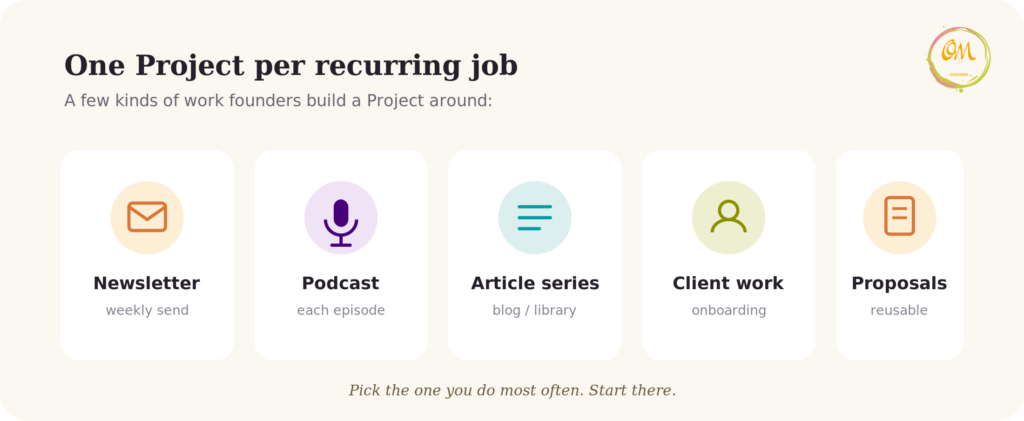
Choosing the work before you choose the setup is what keeps you from building a giant, generic workspace full of disconnected material that helps with nothing in particular.
Let’s make this concrete with one example we’ll carry through. Picture a writer who publishes a periodic Substack — essays on the themes she’s been following, not on a fixed daily or weekly clock, but often enough that it’s clearly a recurring job. Right now she writes each essay inside a single chat: she opens a window, re-explains her voice, pastes in an old piece so Claude can match her style, describes her structure — and then gets to the actual idea. When the chat gets long, she starts a new one and does the whole setup again. (If you send a weekly newsletter, or write client session notes, or draft proposals, picture that instead — the shape is identical.)
That repeated re-explaining is exactly what a setup removes.
The Omni framework: Observe → Design → Reuse
Why bother at all? You’re not organizing tools to feel organized. You’re clearing the repeated, draining busywork off your plate so your attention is free for the work that actually needs you. Setup serves that — and when you keep that straight, you build only what earns its place.
People often begin with the tool: “Everyone’s talking about Projects; I should make one.” Then they’re left staring at an empty workspace, unsure what it’s meant to hold. Start somewhere earlier. Before you build anything, watch your own work.
Observe. Look for the work that returns in a recognizable shape: the email replies that follow the same pattern, the weekly content angles, the client recap after each call. Our writer’s Substack essays belong here. Her once-a-year keynote does not. These repeats are what’s worth setting up — not the exciting one-offs. (One hidden step often surfaces here: if you’ve never actually written down what good looks like for that task — your own standard — that’s the real first job, before any tool.)
Design. Build one focused Project for that single task, and give it what it needs to do the job (we’ll cover exactly what, next).
Reuse. Run it. Then fold your corrections back in. When you find yourself fixing the same thing twice, that fix belongs in the setup, not in another one-off comment. It gets sharper each time you use it, instead of you re-explaining yourself each time you open it.
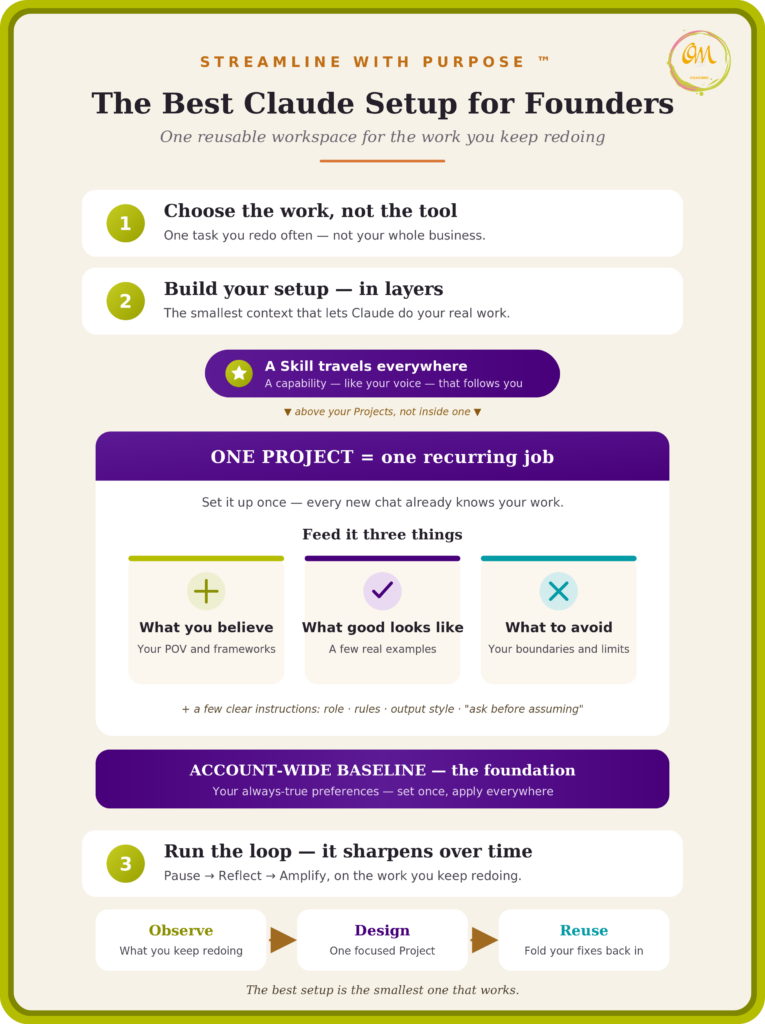
Observe, design, reuse. It’s the same rhythm underneath everything here — Pause → Reflect → Amplify — applied to the least glamorous corner of your week: first you notice what you keep redoing, then you shape it with intention, then you let it carry the load.
The centerpiece: one reusable Project
First, the concrete part, because “Project” can sound more abstract than it is. It’s a real button. In Claude’s left-hand sidebar you’ll see Projects; click it, then Create project, and you’ve made your container. Inside it are two things that matter: a box for your instructions, and a place to add your files. That’s the whole apparatus.
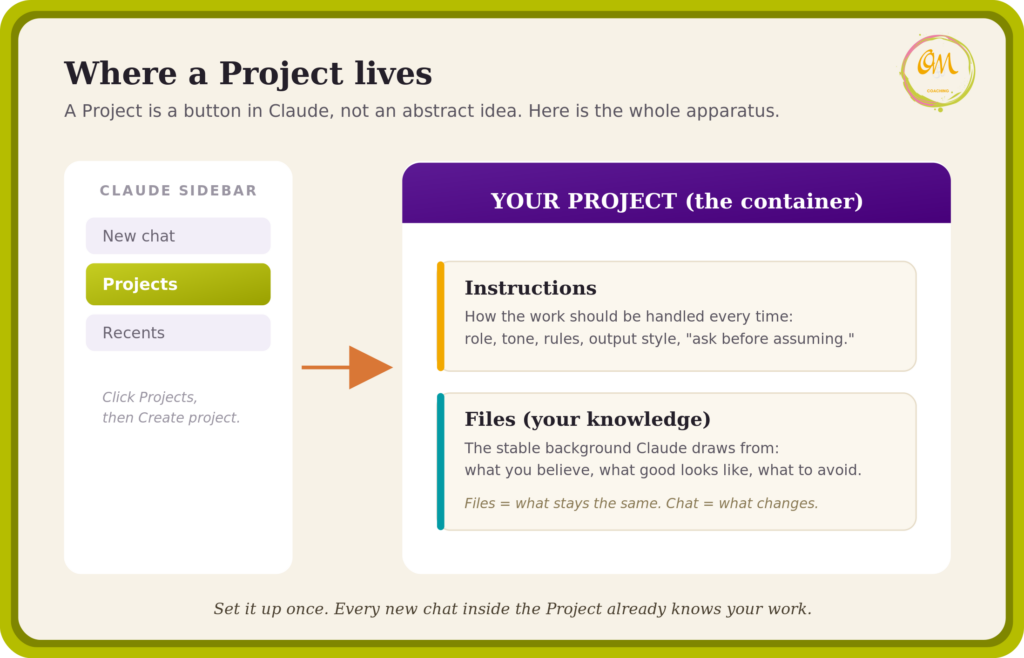
A Project, then, is a self-contained workspace with its own chat history and its own knowledge base – a place where you set instructions once and Claude follows them across every conversation inside that space (as described in Anthropic’s Help Center, What are projects?).
You don’t need a paid plan to start: Projects work on the free plan, up to five of them. Paid plans simply let a Project draw on more uploaded material, so the capacity isn’t identical across every tier.
For our writer, a Substack Project is the room where all her constant background lives permanently. She walks in, and Claude already knows her voice, her structure, her standard. She just brings the one thing that changed: this essay’s idea.
One practical note: a chat inside the Project will still eventually get long, and you may need to start a fresh conversation. The difference is that a new chat doesn’t mean starting over. The room is still furnished — her voice, her examples, her structure are already waiting for her. That’s what a standalone chat thread can’t give you, the one you keep having to rebuild from zero.
Feed the Project three kinds of source material. A useful Project holds three things:
- What you believe — your point of view, your principles, the frameworks you work from.
- What good looks like — a few real, finished examples of the output you want. (Examples teach Claude your format far more reliably than adjectives do — consistent with Anthropic’s own prompting best practices.)
- What to avoid — your exclusions, your tone boundaries, the claims you won’t make, the guardrails on how the work gets done.
That third one is the one people skip, and it’s often what makes the difference between output that sounds like you and output that sounds like the internet’s average.
Write instructions Claude can actually use. Alongside the files, give the Project a short set of instructions — a light structure, not your whole system: the role Claude is playing, the context it’s working in, your working rules, your output preferences, and one line that matters more than it looks: ask before assuming. Five to eight clear instructions beats a page of vague ones.
Set a small account-wide baseline
Claude gives you two places to set instructions (per Anthropic’s personalization features, updated 2026). Knowing which belongs where saves you from restating the same basics in every new conversation:
- Account-wide instructions apply to all your conversations — the constant things. “I’m a solopreneur. Keep answers concrete. No hype. Here are the terms I use for my work.”
- Project instructions apply only inside that one workspace — the task-specific things. “This is my Substack. Here’s the structure. Here’s the voice.”
Set the always-true things once at the account level, and you stop repeating your basics everywhere. Save each Project’s instructions for what’s true only for that task. Broad baseline underneath; focused rooms on top.
Chat, Projects, and Skills: which does what
These three get tangled, so here’s the plain version.
A chat is a single conversation. For a quick, one-off question, a plain chat on its own is all you need – no Project, no setup. You only reach for a Project when the work repeats and you’re tired of rebuilding the same context each time.
A Project is the container for that recurring work – a place that holds your instructions and files, so every chat you start inside it begins already knowing them. A Project isn’t a separate “mode”: it works whether you’re asking a quick question or handing Claude a longer, multi-step task, and Claude is increasingly good at deciding which of those your request needs. The Project is simply where your context lives.
A Skill is different from both, and it isn’t tied to Projects at all. It’s a reusable procedure that travels with you and works everywhere across Claude – inside your Projects, inside plain chats, wherever you’re working. Your writing voice is the classic example: build it once as a Skill, and Claude sounds like you whether you’re in a Project or dashing off a quick chat. That’s the tell: if something should follow you everywhere, it’s a Skill, not a Project.
Start with the Project. Add a Skill later, once you’ve got a repeatable process worth carrying everywhere.
The first 30-minute setup
If you do nothing else, do this today:
- Pick one repeating job — the one you redo most and enjoy least.
- Create one Project for it.
- Add a short anchor file — a page or two of your real context (what you believe / what good looks like / what to avoid).
- Add five to eight instructions — role, context, working rules, output preferences, “ask before assuming.”
- Test it with one real task — an actual piece of this week’s work, not a practice run.
- Revise based on what you override — every time you fix the same thing twice, move that fix into the setup.
Thirty minutes, one Project, one real test — and you sharpen it from there.
What not to set up yet
A few things to leave alone for now:
- Don’t create five Projects. One, well-built, earns the second.
- Don’t upload every business document. More files is not more understanding — it often just adds noise. Focused, relevant material helps; dumping everything in doesn’t.
- Don’t build a custom Skill before you have a repeatable process. You can’t package a workflow you haven’t found yet.
- Don’t assume memory replaces your source material or your judgment. Uploading documents doesn’t guarantee complete or perfect recall — treat the files as strong source material you still direct, not a brain that now fully knows you.
Two quick guardrails
Choose your memory and privacy settings intentionally. Claude’s memory and data controls are worth a deliberate look — decide what you’re comfortable having retained between chats, and don’t upload information you wouldn’t want stored. (These settings evolve, so review the current options in your account settings rather than trusting a description here.)
Keep the consequential calls human. Claude synthesizes, drafts, organizes, and proposes. The strategic choices, the client commitments, the final publish — those stay yours. That’s the whole point of the setup: it carries the labor so you can spend yourself on the work that needs your judgment. (If you want the deeper version of how to keep that judgment human, that’s its own piece: What Is AI Discernment?)
FAQ
What is the best Claude setup for a founder? One small Project built around a task you keep redoing, holding your real context, plus a few account-wide preferences. Not one universal configuration — the smallest setup that lets Claude support your real work without you repeating yourself.
Should I use Claude Chat or Projects? Chat for one-off, low-context work. A Project for anything you come back to and want grounded in the same context every time.
What should I put in a Claude Project? Three things: what you believe (your POV and frameworks), what good looks like (a few real examples), and what to avoid (your boundaries and exclusions) — plus five to eight clear instructions.
What are account-wide instructions? Preferences that apply across all your conversations — tone, working style, the terms you use — as opposed to Project instructions, which apply only inside one workspace.
When should I use a Skill? Once you have a repeatable process you want Claude to follow everywhere, not just in one Project. A capability that should travel with you is Skill territory.
Do I need a paid plan? Projects exist across plans, but enhanced knowledge retrieval and the desktop agent experience are on paid tiers. Chat-based work needs no paid plan. Check current plans for what each tier includes today.
The pause before the setup
The tool tutorials skip this part. A good setup isn’t about doing more. It’s about not rebuilding the same context every week.
So before you open a single Project, sit with one question: what do I keep redoing that a well-briefed helper could carry? Answer that honestly and the rest gets obvious — you already know the task, you’re just naming it.
The setup is not the achievement. It’s a small clearing in your week: less time rebuilding the brief, more attention for the work that needs your judgment, your taste, and your presence. AI carries the rest. 🦋
Take your next step:
Not sure where AI is quietly draining your week? Start with the State of Your Systems Audit.
Want the rest of the series? Explore the AI Knowledge Library.