

How founders can reduce tool fatigue, decision fatigue, and AI noise—without losing the useful leverage AI can provide.

AI overwhelm is not a sign that you are behind. It usually means too many tools, possibilities, and open decisions have entered your business without a clear role or system. Reduce it by choosing one primary AI workspace, assigning every other tool a specific job, and releasing anything that creates more maintenance than value.
You do not need to use fewer tools simply to prove you are disciplined. You need a business ecosystem in which your tools, AI, workflows, knowledge, and ways of working support the human running it.
For the Omni Mindfulness AI Knowledge Library, I use Claude as the default example because it can serve as a consistent workspace for thinking, organizing context, and deciding what is needed next. But the method applies whether your primary tool is Claude, ChatGPT, Gemini, Perplexity, or another AI platform.
Key Takeaways
- AI overwhelm is often decision fatigue and tool sprawl—not a lack of AI skill.
- The goal is not to keep up with every new tool. It is to give each tool a clear, useful role.
- Claude can be a primary workspace for thinking through the problem before adding another platform, prompt, or automation.
- A tool earns its place when it reduces meaningful friction in a recurring workflow.
- The repeatable move is: audit what is creating friction, choose what deserves a role, and protect the human attention the system is meant to support.
- Useful AI should create more capacity for judgment, relationships, and meaningful work—not another system to manage.
What AI Overwhelm Actually Is
AI overwhelm is what happens when possibility expands faster than your ability to evaluate it.
A task that once began with, “I need to write this,” can now become six decisions before you begin:
- Should I research this in one tool and draft it in another?
- Do I need a custom assistant, template, automation, or workflow first?
- Which subscription should I keep?
- Where does the useful information from this conversation belong?
- Will this tool save time once I include setup, checking, editing, and exporting?
- Am I using this because it solves a real problem—or because I am afraid of missing what everyone else knows?
The work itself has not always become harder. But the work around the work has multiplied.
That is tool fatigue: the mental cost of learning, comparing, maintaining, checking, and remembering a growing collection of platforms. It becomes decision fatigue when every task requires you to decide not only what to do, but which system should do it.
The broader data supports the feeling. In a 2024 survey of 2,500 global workers, 77% of people using AI said the tools had decreased their productivity and added to their workload in at least one way; 47% said they did not know how to achieve the productivity gains expected of them. (Upwork Research Institute)upwork
Microsoft’s 2024 Work Trend Index found that 68% of surveyed knowledge workers struggled with the pace and volume of work, while 46% reported feeling burned out. (Microsoft WorkLab)microsoft
These findings are not proof that AI is the problem. They suggest something more useful: introducing new tools into an already fragmented way of working does not automatically create relief.
A founder can have excellent tools and still feel scattered. The missing piece is often not another capability. It is a clear way to decide what belongs in the system, what does not, and what needs to remain human.
The Tool Clarity Check: Audit, Choose, Protect
This is the practice underneath the way I work with tools. Three moves, applied before a new AI platform becomes part of your normal workflow. Underneath them runs the Omni rhythm: Pause → Reflect → Amplify.
The three moves sit between a familiar starting point and a more intentional outcome: audit the friction creating the overload, choose what genuinely belongs in your workflow, and protect the attention the system is meant to support.
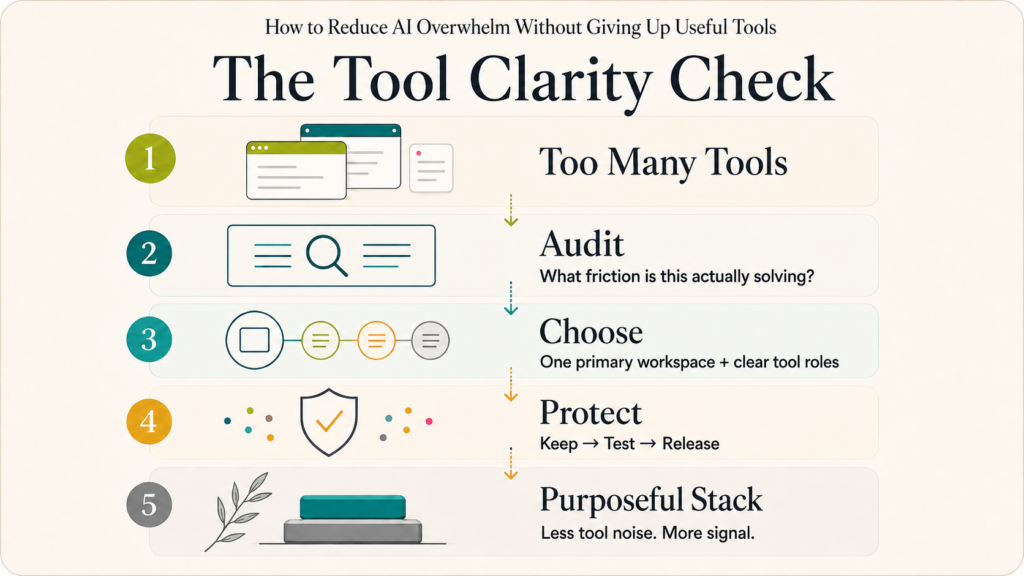
The judgment inside these moments is what makes streamlining practical: audit the friction, choose the simplest useful system, and protect the attention the system is supposed to support.
1. Audit — What is actually creating friction? (Pause.)
Before trying a new tool, name the problem in one sentence.
“I need a better AI tool” is not a problem. It is a vague feeling.
“I spend 45 minutes after every client call trying to locate decisions and next steps across notes, email, and messages” is a problem. It can be evaluated.
Look for recurring friction:
- Searching for prompts, research, ideas, files, or prior decisions
- Recreating work you know you have already done
- Switching repeatedly between tools to finish one task
- Paying for overlapping capabilities
- Checking AI output so heavily that the tool adds work instead of removing it
- Experimenting with tools without deciding whether they earned a lasting role
The goal is not to eliminate every inconvenience. It is to identify the friction that repeats often enough to deserve a system-level response.
2. Choose — What is the simplest useful setup? (Reflect.)
Once you know the actual problem, choose the smallest setup that can reliably solve it.
Start with one primary AI workspace. In this library, Claude is the default example: the place to clarify the problem, organize supporting context, examine options, and decide whether another specialized tool is necessary.
That does not mean Claude has to do everything. It means you begin in one familiar place instead of opening five tabs and comparing tools before you understand the task.
A useful rule is:
Start in your primary workspace. Add a specialist tool only when it has a defined job that your primary workspace cannot reasonably do—and when it replaces more friction than it creates.
If ChatGPT, Gemini, Perplexity, or another platform is already your established workspace, use the same rule there. This is not about tool loyalty. It is about reducing unnecessary decisions.
3. Protect — What needs to remain human? (Amplify.)
A streamlined system should protect the parts of work that require you: your judgment, values, relationships, taste, and final accountability.
Do not automate a decision simply because it can be automated.
You may want AI to organize source material, identify patterns in notes, draft options, summarize a long document, or prepare a first-pass workflow. But you still decide:
- What problem matters most right now
- Which information is relevant
- Whether the output is accurate enough to use
- Which tool has earned a continuing place
- What gets published, sent, approved, or acted on under your name
The point is not to have the leanest possible stack. It is to create enough space to think clearly inside the stack you keep.
Practical Steps: Reducing AI Overwhelm on Any Tool
Name the bottleneck before choosing the tool. Write the repeated problem in one plain sentence. If you cannot explain what is breaking down, you are not ready to select the solution.
Choose one primary AI workspace. Use Claude, ChatGPT, Gemini, or another established tool as the place where you start to think, plan, and assess. A default reduces unnecessary comparison and context switching.
Give every tool one primary job. A tool may have many features, but you should be able to say why it exists in your business. For example: live research, visual production, calendar automation, meeting transcription, or workflow documentation.
Use a one-in, one-out rule. When a new tool enters the active stack, ask what it replaces: an old tool, a manual process, or a repeated source of friction. If it replaces nothing, it is an experiment—not a necessary addition.
Set a time-bound test. Do not “try” a tool indefinitely. Give it one workflow, a success measure, and a review date.
For example:
For two weeks, I will use this tool to turn client-call notes into a decision and action summary. I will keep it only if it saves time, produces usable output, and does not create more correction than the old process.
Track friction, not only speed. Include setup, prompting, reviewing, correcting, exporting, storing, and searching. A tool that produces a fast first draft but creates an hour of cleanup has not created a meaningful productivity gain.
Keep a release rule. Pause or remove a tool when it duplicates another platform, is not used regularly, demands too much maintenance, or has not shown clear value after its test period.
Watch your nervous system, not only your tool stack. If every new AI tool feels urgent, the problem may not be that you have not found the right system. It may be that your attention is already carrying too many open loops. When you cannot pause long enough to choose, more options create more noise.
AI overwhelm is often visible in tools first. But it can be part of a larger pattern: unclear priorities, scattered knowledge, reinvented workflows, or ways of working that ask the founder to hold too much alone.
In plain English: are you choosing your tools intentionally? Is AI serving a defined purpose? And can you find and reuse work you have already created without starting from scratch?
If you want a clearer picture, take the free 5-minute Streamline With Purpose™ Diagnostic. It helps founders see where their ecosystem is already supporting them, where recurring friction is quietly costing time and attention, and what to streamline first.
One Technical Tip: Create an AI Tool Stack Project
Create a dedicated Claude Project called:
AI Tool Stack
Add one simple reference file containing:
- Your active AI tools and subscriptions
- The primary job of each tool
- The recurring workflow it supports
- What it replaces, if anything
- Known friction points or duplicate capabilities
- Tools currently being tested
- A Keep, Test, or Release status for each tool
Then add Project Instructions such as:
Help me reduce tool sprawl rather than add to it. Before suggesting a new AI tool, identify the specific bottleneck it solves, the current tool or process it would replace, the maintenance it will add, and how I will know whether it worked. Prioritize fewer tools, clearer workflows, and human judgment over novelty.
Claude Projects allow you to add project knowledge and project-specific instructions that Claude can use across chats in that Project. (Claude Help Center)support.anthropic
Claude is my default workspace for this because it gives the system one consistent home. But the practice is tool-agnostic. If ChatGPT, Gemini, or another platform is your primary workspace, create the same kind of tool-stack reference there.
The point is not to ask AI to decide your stack for you. It is to make your criteria visible, so you can notice duplication, drift, and unexamined habits before they become another source of overwhelm.
What Streamlining Looks Like in Practice
A research tool becomes a defined role
A founder may use several tools for research, then lose track of which source said what and which findings are verified. The useful shift is not necessarily to cancel every research tool. It is to assign roles.
For example: use a live-research tool to locate current sources, then bring the selected material into Claude to organize the findings, identify gaps, and connect the research to the actual business question. The founder still verifies the claims and decides what belongs in the final work.
The tool is no longer “something I should try.” It has a defined place in the workflow.
A meeting tool becomes a test, not a commitment
A founder tries an AI meeting assistant because follow-up tasks are getting lost. Instead of automatically making it part of every call, she tests it for two weeks against one question:
Does this give me a more usable record of decisions and next steps than my current method?
If it reduces the after-call administrative burden, it may earn a place. If it produces another dashboard, another email summary, and another thing to review, it has revealed that the real problem is not transcription. It is workflow design.
A prompt library becomes reusable knowledge
A founder saves useful prompts, research, content ideas, and client insights across documents, browser tabs, notes apps, and messages. When she needs them again, she searches, recreates, or gives up.
The first move is not a new tool. It is choosing one home for reusable knowledge and deciding what belongs there. A prompt that supports a recurring task, a research source that will matter again, and a proven workflow should be easy to locate and reuse.
That is the difference between collecting information and building a system.
The Guardrail: What Streamlining Protects
Streamlining exists to keep five things from being quietly consumed by an overgrown system:
- Attention — the ability to focus on the task that matters instead of managing the tools around it
- Continuity — the ability to find and build on what you have already created
- Judgment — the ability to decide what is useful, relevant, accurate, and worth keeping
- Capacity — time and energy for client work, strategy, relationships, rest, and original thought
- Agency — the ability to choose your system rather than being led by every new platform or promise
AI can support each of these. But no tool can protect them if the overall ecosystem has no boundaries.
The point is not to use AI less. It is to stop letting AI use up the attention it was meant to support.
Frequently Asked Questions
How do I stop feeling overwhelmed by AI?
Start by naming the actual problem rather than searching for another tool. Choose one primary AI workspace, give every other tool a defined job, and pause or remove tools that create more maintenance than value.
What is tool fatigue?
Tool fatigue is the mental and practical burden of learning, comparing, managing, checking, and switching between too many platforms. It often appears as scattered attention, unfinished experiments, duplicate subscriptions, and difficulty deciding where work belongs.
Do I need to stop using useful AI tools?
No. The goal is not minimalism for its own sake. Keep the tools that support recurring work, reduce real friction, and earn their maintenance cost. Release what duplicates, distracts, or creates more work than it removes.
Should I use Claude or ChatGPT as my primary AI workspace?
Use the platform you can work with consistently and thoughtfully. This library often uses Claude as the default example because it supports project-specific knowledge and instructions, but the larger method is transferable. One clear primary workspace is more important than using a particular brand of tool.
How do I know whether an AI tool is worth keeping?
Ask five questions: What problem does it solve? What does it replace? How often do I use it? What maintenance does it create? Would anything meaningful break if I removed it? If its value is unclear after a defined test, it has not earned a permanent place.
Is AI overwhelm only about tools?
Usually not. Tool overload can reveal broader friction in workflows, priorities, knowledge management, boundaries, and ways of working. The tool stack is often where the problem becomes visible—not where it began.
The Real Question
The better AI gets, the more options you will have. More tools will be useful. More platforms will be impressive. More promises will sound urgent.
None of that means all of them belong in your business.
The work is not to become an expert in every new tool. The work is to become clear about what supports your business, what scatters it, and what you need to protect so the system can serve the human running it.
So before you add the next app, automation, or subscription, pause and ask:
Will this help me do the work—or give me one more system to manage?
Your pause is your compass. — Shilpa